
My 99 Exchange — Load the Token Tray by UPI and Cash Out Through a Secure Desk
Searching my 99 exchange usually means one thing: you already hold a 99Exch ID and want to fill it, check it or empty it. This page covers that token tray, from a UPI or bank top-up raised on WhatsApp to the cash-out request and the statement line that proves each move. It quotes no times or amounts.

My 99 Exchange Coin Slot: Secure Sign-In to Your Wallet
Balance, statement and request history stay hidden until the 99Exch sign-in goes through. So start here.
The falling coin is decoration, and so are these two boxes. Your password only ever goes into the 99Exch portal tab that the sign-in button below opens, captcha and all.
My 99 Exchange Account Area: The Official Balance, Statement and Requests
After the my 99 exchange login, the part of a 99Exch account people come back to most is not a game at all. It is the money side. A balance sits at the top, a statement lists everything that was credited, staked and settled, and both the deposit route and the withdrawal route run through a person on the WhatsApp desk rather than through an automatic cashier button.
Searchers reach it three ways: my 99 exchange, my 99exch, or the longer my 99 exchange login when they want the door before the room. All three end in the same place, which is one 99Exch ID with one balance, on whichever mirror address happens to be loading that day.
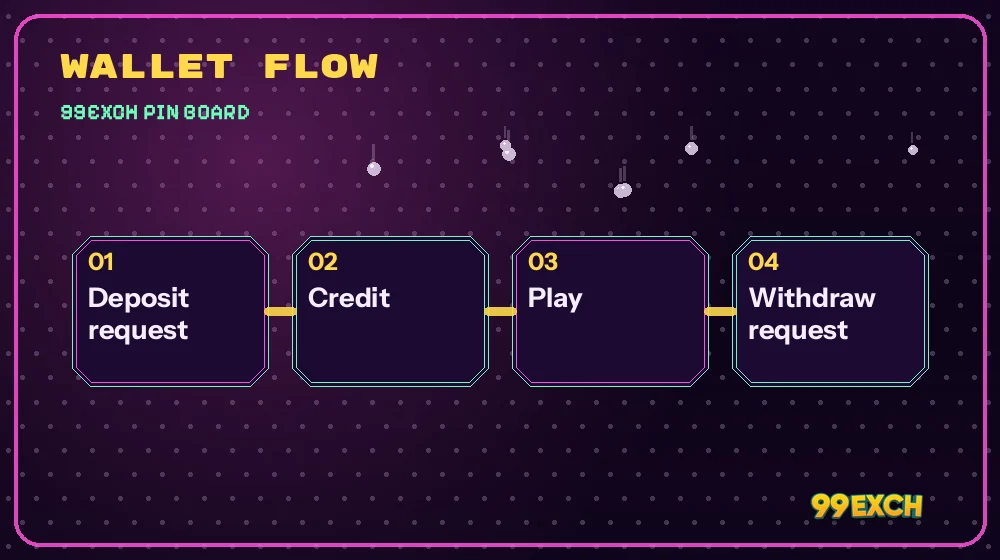
The order is fixed. Money comes in through a deposit request, sits in the balance while you play, and leaves through a withdrawal request; skip a stage and the statement stops making sense, which is why the lanes below follow the same sequence, top-up first, cash-out second, statement reading in the middle of the page and desk questions after it.
The live 99Exch balance you see first
This is the figure that funds every stake. It rises when the desk adds a deposit, drops the moment a bet is placed, and moves again when a market settles. If it looks off, the statement underneath is where you check, before anyone messages anybody.
A clear 99Exch statement of each line
Every credit, stake, result and payout gets a row of its own. Reading those rows is covered in lane four below, because a wallet query goes far quicker when you can point at the exact entry instead of describing a feeling that the number is wrong.
Secure 99Exch requests for top-ups and cash-outs
Neither side is a single tap. You raise the request with the desk on WhatsApp, the desk handles it, and the statement records it. That three-part loop is the whole cashier, more or less.
My 99 Exchange Deposit by UPI or Bank Transfer: The Quick Desk Route
Two rails, both Indian. A 99Exch deposit goes in by UPI or by an ordinary bank transfer, and no minimum, ceiling or credit time is published for either, so none is printed here. What this lane can give you is the order of moves that keeps a top-up easy to trace afterwards.
- Sign in through the my 99 exchange login and note the balance as it stands right now. That figure is your before-picture.
- Use the existing chat with +91 81097 11726 rather than a fresh one: a 99Exch top-up note sitting under your original ID message is easier for the desk to match.
- Ask which route is current, UPI or bank transfer, and pay only to the details the desk gives you inside that same chat, never to anything forwarded by a stranger or saved from a months-old conversation.
- Pay from your own UPI app or net banking, and keep the success screen open until it shows the transaction reference, called the UTR on most Indian bank apps.
- Send that reference, or a screenshot of the success screen, back into the same chat thread.
- Refresh the wallet once the desk confirms. A deposit line appears on the statement and the balance changes to match it.
What goes wrong most often? Paying to old details copied from an earlier chat. Payment routes on a desk-run cashier can change, so ask each time, even when it feels repetitive (it is, a little). The second usual snag is the reference itself: people close the bank app before the receipt loads and then cannot find the UTR. It is still sitting in your bank or UPI app's transaction history, so open that, copy it, and send it.
A UPI payment that shows as pending on your side is a bank matter first. Wait until your own app marks it successful or failed before you chase the 99Exch desk, because the desk can only match a payment that has actually landed. Paid twice by accident? Say so in the same thread with both references; mixing two requests across two chats is the quickest way to slow both down.
A deposit mesage that works on the first read: your 99Exch username, which rail you plan to use, UPI or bank transfer, and a request for the current details. After paying, a second message in the same chat with the UTR. Two messages, one thread, nothing for anyone to untangle later.
My 99exch Withdrawal Request: A Secure Order for What You Send
Cashing out runs the same loop backwards. A withdrawal on my 99exch is a request, not a transfer you fire off yourself: you ask, the 99Exch desk processes it, and a debit line lands on the statement. The steps below are the order that tends to cause the fewest follow-up questions.
- Open the statement and confirm the balance covers what you want to take out. Money still riding on a market that has not settled is usually not counted as free yet.
- Write to the desk from the WhatsApp chat where your 99Exch ID details first arrived, giving your username and the amount you want to withdraw.
- Add where it should go: a UPI ID, or a bank account number with its IFSC code and the account holder's name, typed out in full.
- Read your own message back before sending it, because one wrong letter in a UPI handle is the classic reason a payout stalls.
- Hold off on a second message until the desk replies in the thread. 99Exch publishes no processing window, so this page does not invent one.
- Check the statement for the withdrawal line, then check your bank or UPI app for the matching credit.
Quick 99Exch checks before you hit send
Same username as the one on the statement. Destination details spelled correctly. No unsettled stake you were hoping to include. Both should agree, the statement figure and the request figure, or the desk will simply ask you which one you meant.
Why a demo 99Exch ID cannot cash out
Look at the top of a Login with Demo ID statement: there is no deposit credit, because nobody paid anything in. That missing line is the whole story. Tokens that never entered the tray through UPI or a bank cannot leave it through one either, so cash-out requests belong on your real 99Exch ID.
Want the money to go somewhere new this time, a different UPI handle or a second bank account? Say that clearly in the request rather than assuming the desk remembers the last one. In practice it is easier to repeat your details every time than to explain later why a payout went to an account you had stopped using.
If the desk replies asking for something you already sent, it is usually because a detail did not line up: the username in the message differs from the one on the statement, or the amount requested is more then the free balance once open stakes are taken out. Fix the one thing they point at and reply in the same thread. Starting a fresh chat feels faster. It rarely is.
| Stage | Deposit on my 99 exchange | Withdrawal on my 99exch |
|---|---|---|
| Who starts it | You, by asking the desk for current payment details | You, by sending a request with destination details |
| What you send | Username, then the UTR or success screenshot | Username, amount, UPI ID or bank account with IFSC |
| Money moves from | Your UPI app or bank to the route the desk gives | The 99Exch wallet to your own UPI ID or bank account |
| Proof on the statement | A deposit credit line | A withdrawal debit line |
| Where you confirm it | The wallet balance after a refresh | Your bank or UPI app |
| Published time or limit | None stated | None stated |

Reading the My 99 Exchange Statement: Clear Ledger Lines, Row by Row
Most wallet questions answer themselves once the statement is read properly. The 99Exch ledger lists movements in date order, and each kind of line means something specific. Labels on the portal screen may be worded a little differently from the ones below; it is the logic that matters, not the exact word.
- Deposit credit
- Funds the desk added after your UPI or bank payment. If you paid and no such line exists, that is the moment to send your reference to the desk, not before you have looked.
- Stake placed
- Money moved out of the free 99Exch balance into a cricket market, a casino round or a crash game. On the statement it is simply a minus figure with the event beside it.
- Settled result
- The market or round has closed and the outcome is booked. A winning result adds to the balance; a losing one leaves it where the stake already took it.
- Withdrawal debit
- The cash-out the desk processed. Its figure should match what later reaches your bank or UPI app, to the rupee.
- Running balance
- The 99Exch column that ties the rest together. Work down the page, adding and subtracting, and you should land on the number shown at the top of the wallet.
A worked reading, without figures. Say you topped up in the afternoon, backed a side in an IPL match, played a few aviator rounds after dinner and then saw a balance lower than you expected. Start at the 99Exch deposit line. Below it you should find the cricket stake, then a row for each aviator round, then perhaps nothing for the match at all, because it has not finished. More often than not the missing money turns out to be that open stake, sitting exactly where the statement says it is, waiting for the result.
Date order, top down. If every row adds up and the figure is still wrong, then you have a real query, and a precise one: the date, the line, and what you think it should say.
A line you genuinely do not recognise is a different case. Note its date and the event named beside it, then think back: a casino round played on the app while you were checking the score in a browser still lands on the same 99Exch statement, and people forget those. Still a stranger? Send that single line to the desk and ask what it is. Do not send the whole statement as a screenshot; one row is easier to match than forty.
Wallet Questions for the 99Exch Desk: Trusted My 99 Exchange Support
Before you type to the 99Exch desk, have three things in front of you: your username, the statement line you are asking about, and any payment reference. One message with all three beats four messages with one each.
And when the desk replies that a deposit or withdrawal is done, the job is not quite finished. Open the 99Exch wallet, find the new line on the statement, and and only then close the chat. If the line is missing, you are still in the right thread to say so.
The desk is the same WhatsApp contact that handles new IDs and password resets, so a wallet message should say up front that it is about money. A first line like Deposit query, username and UTR below
or Withdrawal request, details below
tells whoever reads it which job they are doing before they scroll.
Typical wallet questions are short. A deposit that left your bank but is not on the statement. A withdrawal you want confirmed. A line you do not recognise. A locked my 99 exchange login that keeps you from even seeing the balance, which is a password reset first and a wallet question second. How to save the number properly and what the chat looks like on day one is laid out on the 99Exch WhatsApp number page, so it is not repeated here.
Keep the password you changed after your first sign-in to yourself; a wallet query is about a statement line, not about your login, and the 99Exch desk can match a payment from the username and the reference alone.
My 99 Exchange Login and Wallet Terms: The Official Search Words
Where the my 99 exchange search lands on this wallet page
People type my 99 exchange when they already hold a 99Exch ID and want the money side of it: the balance, the statement and the cashier requests. This page answers exactly that, lane by lane, and keeps the sign-in itself to the coin-slot card near the top.
- top-ups by UPI or bank transfer, raised in lane two
- cash-out requests and the checks before them, in lane three
- statement rows read one by one in lane four
How the my 99 exchange login opens the secure cashier side
Nothing about the wallet needs a second account: the coin-slot card at the top and the portal both point to the one my 99 exchange login you already use for cricket and casino play on 99Exch.
- typed into the coin-slot card
- a mock-up only; the real form with its captcha opens on the portal
- after the real sign-in
- balance, statement and request history show inside the account
Why my 99exch, typed joined, reaches the same trusted wallet
Searchers who type my 99exch as one word, or my 99 exchange login with spaces, are after the same wallet on the same ID. Spacing changes nothing about the balance, and neither does the mirror address you happen to open, because a working 99Exch mirror shows the same ID with the same balance.
Players also search
- my 99 exchange
- my 99 exchange login
- my 99exch
- my 99exch login
- my 99 exchange deposit
- my 99 exchange withdrawal
- my 99exch statement
- 99exch wallet upi
- my 99 exch balance check
One 99Exch Wallet in Live Play: The Same Real Balance on Every Table
Live 99Exch markets draw on this balance
Your IPL-season cricket stake and a kabaddi or football punt come out of one tray; so does a horse race. Prices move quickly in-play, and the balance follows them line by line. The 99Exch live markets page covers what the in-play side shows.
Casino and crash games on the same 99Exch wallet
Teen patti, andar bahar, roulette, aviator, mines: there is no separate casino purse. Each round is a stake line and a result line on the one statement. What the username and password actually open across the lobby is set out under your 99Exch ID details.
Browser, Android app, a mirror address such as .red or .live when the usual one is blocked by an ISP: all of them read the same 99Exch wallet, because the balance belongs to the ID and not to the address you typed. That is the theory, anyway. In practice the only thing that changes between them is how the screen is laid out.
So a top-up made while you were on the browser is already there when you open the Android app on the bus home, and a cash-out request sent from the app shows on the statement in the browser too. If two screens ever seem to disagree, sign in again on both before reading anything into it; one of them is probably showing an older view.
One line on limits, since this is the money page. Any spend cap is your own to set, before a top-up rather than after a loss, and the 99Exch responsible gaming page has the tools and the helpline for it. 18+ only.
My 99 Exchange FAQ: Quick Wallet Answers from 99Exch
What is my 99 exchange?
My 99 exchange is how people search for the cashier end of their 99Exch account rather than the games: one balance that funds every stake, a statement that records it, and two request routes, deposit and withdrawal, both handled over WhatsApp. Browser, Android app and any working mirror all show that same tray.
How do I deposit money in my 99 exchange?
Ask the 99Exch WhatsApp desk for the current UPI or bank details, pay to exactly those, and post the UTR back in the same chat. Ask first, pay second, report third. The tray counts as filled only when a deposit credit appears on your statement and the balance at the top has moved.
How do I withdraw from my 99exch?
Send the 99Exch desk a WhatsApp request naming your username, how much you want out, and the UPI handle or bank account with IFSC that should get it. Check the spelling first. Once the desk confirms, look for the withdrawal debit on your statement and the matching credit in your bank app. Practice balances cannot be cashed out.
Where can I see my 99 exchange statement?
Sign in on the portal and open the wallet area; the statement sits there, below the balance. Read it top down as a date-ordered list where every deposit credit, stake, settled result and withdrawal debit carries a running total, which is the figure you quote to the desk if something looks wrong.
Who do I contact about a problem with my 99 exchange wallet?
Message +91 81097 11726, the 99Exch WhatsApp desk, and store it as a contact with the +91 prefix so WhatsApp recognises it. Open with deposit or withdrawal as the first word, then your username, the statement date and the UTR; that way one reply from the desk can close the wallet issue.