99exch Com Login Password — Recover It Securely and Set a Fresh One
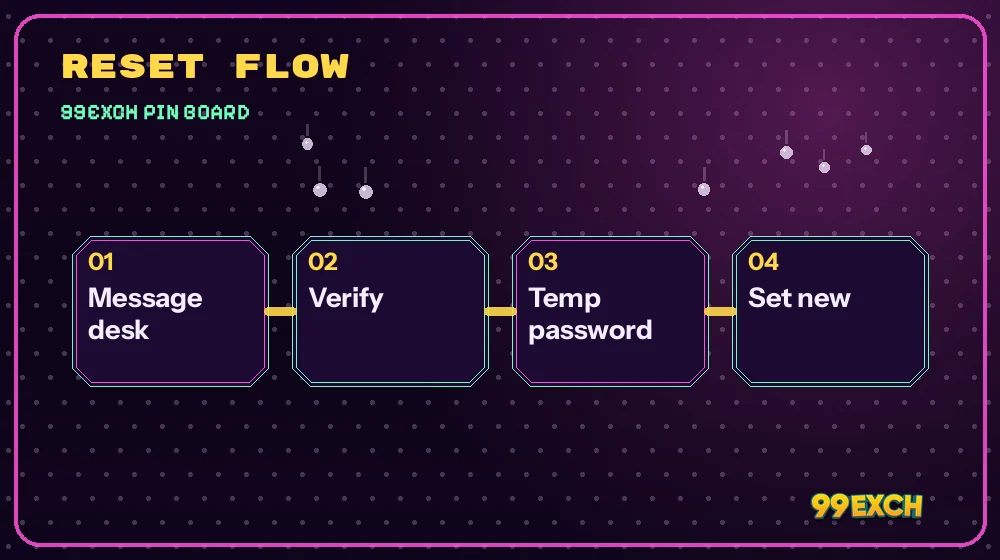
A lost 99exch com login password is fixed through the 99Exch WhatsApp desk, not through a reset link: you message the desk, a temporary password arrives inside that chat, you sign in once with it, and then you replace it with a new password that only you know. Same username, same balance, new key.
99exch Com Login Password Coin Slot: Secure Entry After a Reset
Top line: your old 99Exch username, untouched. Bottom line: the stand-in from the chat, used one time.
Both boxes above are locked mock-ups of the reset sign-in, so they keep nothing. The working 99Exch form and its captcha load on the portal after you tap below.
0199 Exch Forgot Password: the Official Reset Route Through the Desk
There is no "forgot password" email on 99Exch. That surprises people. Accounts here are issued by the WhatsApp support desk in the first place, so the same desk is the one that can put a new password on your ID, and the 99Exch login screen itself has nothing to to click that sends you a reset code.
So the work is short. Message, wait, sign in, change. If you have never saved the desk number, the 99Exch WhatsApp number page shows how to store it and what to type first.
Open WhatsApp and message the 99Exch desk on +91 81097 11726. Say you have lost the 99exch com login password and give the username the ID was issued under.
Expect a short check before anything changes. The desk matches the name you sent against an existing 99Exch account, and a reset is only written for an ID that lines up.
A stand-in password comes back in the thread. Treat it as single-use: it is there to get you through the door one time.
Head to 99exchlogin.com.in, put your old username on the top line and the stand-in password below it, then pass the picture check.
Once inside, go straight to the password change option and set a new 99Exch password of your own before you do anything else.
PIT STOP
Do not close the 99Exch tab between step four and step five. If the session drops before you pick your own password, the stand-in one is still the live key on your account, sitting in a chat history that anyone holding your unlocked phone could scroll back through, so finish the swap in one sitting.
(If the username itself is gone too, say so in the same message. The desk works from the ID, not from a guess.)
02Setting a Fresh 99exch Password That Stays Safe
The temporary 99Exch password was written by somebody else and has sat in a chat thread, which is reason enough to throw it away on the first login. What you put in its place decides whether you ever need this page again.
weakokstrong
Length first
A longer 99Exch password beats a clever short one. Three or four unrelated words strung together are easy to remember and hard to guess.
Mix the characters
Capitals, small letters, digits and a symbol. The form is case-sensitive, so remember where the capitals sit.
Never reused
Not the password from your email, your UPI app or an old 99Exch ID. One leak elsewhere should not open this account.
Nothing about you
Skip your name, team, birth year and phone digits. Those are the first things anyone tries.
One home for it
A password manager or a paper note kept at home. Not a screenshot, and not the same WhatsApp thread the reset came through.
Weak: a single word with a digit tacked on, the kind most people pick in a hurry at the end of a long day when they just want to get back to the cricket book and stop thinking about passwords at all.
Strong: a short phrase only you would make up, with one capital, one number and one symbol placed somewhere other than the end. Probably slower to type. Worth it.
A password manager on your phone takes the remembering off your hands, roughly the way a saved bookmark takes the typing out of the 99Exch address. Not required, though.
99exch Com Login Password and 99 Exch Forgot Password: Official Reset Notes
When a 99 exch forgot password search brings you to this page
A 99 exch forgot password search tends to start after a phone change or a cleared browser, when the autofill that used to sign you in is gone. On this page that query is answered by the desk route, since 99Exch gives you no button that mails out a reset code.
Message the desk with your 99Exch username.
Collect the temporary password from that chat.
Sign in once on the portal with it.
Replace it with your own password straight away.
Your ID, balance and history stay as they were; only the key changes.
How the 99exch com login password works once it has been reset
The 99exch com login password is the second line of the sign-in form, under the username, and it is case-sensitive. After a desk reset the previous password no longer opens the ID, on the browser or on the Android app, so any phone or browser that had the old one saved will show a refusal until you update it.
Pick a long, mixed, unused password, save it in one trusted place, and keep it out of every chat, including the one with the 99Exch desk.
Players also search
99exch com login password
99 exch forgot password
99exch password reset
99exch password change
99exch password bhul gaya
99 exchange login password
99exch temporary password
99exch new password kaise banaye
03After a 99Exch Password Reset: Quick Fixes When the Old One Stops Working
TILT NOTE
The moment the desk resets your 99Exch ID, the old password is dead. Everywhere.
Second devices are where this bites. Say the swap happened on your phone at night and worked first time; next morning the office laptop, still autofilling yesterday's 99Exch password, throws a refusal that feels like a brand new lockout, when all it means is that one saved entry never heard about the reset.
Fix it device by device. Sign out, clear the saved password for the 99Exch login in that browser or app, and type the new one once. The username has not changed, and becuse one ID runs on the browser, the app and every working mirror address, one update per device is enough. Actually, scratch "enough": also check any note or screenshot where you kept the old one, and delete it.
Still refused with the new password? Check capital letters first; the play 99 exch com login typing rules cover case-sensitive entry. Captcha errors and spinners that never finish are a different problem, handled on the 99exch com login fixes for captcha and loading. If none of that helps, go back to the 99Exch desk and ask for a second reset rather than guessing until the form stops you.
Phone browser holding the old 99Exch key
Chrome or Safari may offer the retired password on the sign-in form. Edit or delete that saved entry, then let the browser store the new one after a successful 99Exch login.
Android app needing a fresh 99Exch sign-in
If the 99Exch app still shows your lobby after the reset, sign out from its menu anyway. Coming back in with the new password confirms the change actualy took.
Mirror bookmarks after the 99Exch reset
A .red or .live bookmark points at the same account, so it wants the new password too. Nothing else about the mirror changes.
99exch Com Login Password Questions: Fast, Secure Answers
I forgot my 99exch com login password, what do I do first?
Stop guessing at the form first; another wrong try changes nothing. Then find your 99Exch username, even an old screenshot of it helps, and send it to the support desk with the words forgot password. The desk handles the rest of the recovery, and the next step on your side is waiting for its reply.
How do I reset my 99Exch password safely?
Ask the 99Exch desk for a reset, read the temporary password in the chat, and sign in on the official portal with your usual username. Clear the captcha, open the password change option right away, and set a new password of your own before placing anything on the cricket book or casino tables.
What makes a strong new 99Exch password?
Length matters most, so a short phrase of unrelated words beats one clever word. Mix capitals, small letters, digits and a symbol, avoid your name or phone digits, and never reuse a password from email, UPI or an older 99Exch ID. Store it in one trusted place only.
Does my old 99Exch password still work after a reset?
No. Once the desk resets the ID, the previous 99Exch password stops opening it on the browser, the Android app and every mirror address. Any device that saved the old one will refuse you until you clear that saved entry and type the new password once.
Can the 99Exch support desk see my password?
The desk knows the temporary password because it sends it to you, which is exactly why you change it on the first login. Your new 99Exch password is set by you on the portal and the desk has no reason to ask for it, so never share it in any chat.