99Exch Login — Feed the Official Sign-In Screen and Start Playing Quickly
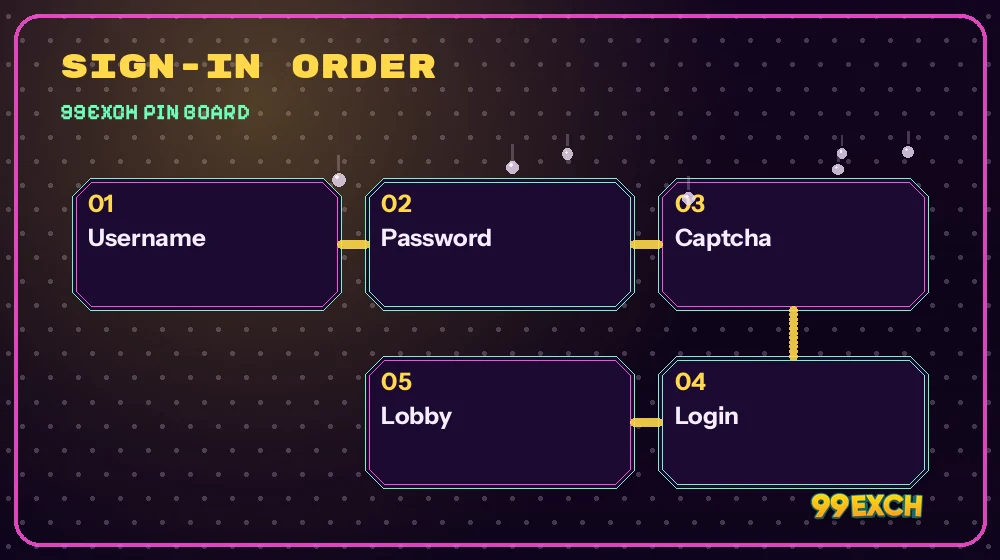
To finish a 99Exch login, fill the sign-in screen from the top down and press Login once; the lobby that follows should open on a balance that is yours. This page treats that screen like a cabinet with labelled slots, matching each one to the 99exch id login message in your chat, so nothing gets fed into the wrong opening.
0199Exch Login Screen, Field by Field: The Official Sign-In Order
Only the upper part of the 99Exch sign-in screen wants typing. Everything under it is a press. People who get refused on the first attempt have usually typed into the right box in the wrong way, which is a diferent problem from typing into the wrong box, and the replica below is here to separate the two before you ever reach the live form.
Sign-in form replica (labels only, nothing to fill)
Usernamethe ID name from your WhatsApp chat
Passwordtemporary at first, then the one you choose
Captchaproves a person is signing in
Loginsends the three typed boxes together
Login with Demo IDpractice balance, no typing needed
Username
This is the 99exch id login name the support desk created for you. It reaches you in the WhatsApp chat alongside a temporary password, and it belongs in the top box character for character. Watch for a stray space when you copy it out of the chat; phones love to add one.
Password
Characters are masked as you type them, which is exactly why most rejected attempts start here. On your first 99Exch visit this box takes the temporary password from the chat. Every visit after that, it takes the password you set yourself.
Captcha
The real form is protected by a captcha check. Read it carefully and type what it shows. If the characters are hard to make out, reloading the sign-in screen will usually give you a fresh one, which beats guessing.
Login
One press submits all three boxes at once. A single wrong character in any of them fails the whole attempt, so check all three rather than only the one you suspect.
Login with Demo ID
The odd one out on this screen, because it ignores whatever sits in the slots above it. Think of it as a house token: it lights the 99Exch cabinet for practice, and the token never turns into cash.
Order matters a little. The captcha is the box people rush, since it comes last and the finish line feels close, yet it is also the one that changes every time the screen loads, so a 99Exch login that failed on the captcha will need the new characters, not the ones you remeber from a minute ago.
Type, check, press. That is the whole 99Exch rhythm, and it is the same whether the screen is open in a phone browser or inside the Android app, because one 99Exch ID works on both.
02Typing the 99exch ID Login Correctly: A Fast, Clean Sign-In
Most refusals come from small copying slips, not from a wrong account. Keep the chat open beside the form.
PIT STOP
Silence the phone for half a minute before feeding the 99Exch form. A notification banner that drops in while the masked password slot is half typed pulls the cursor away, a character goes missing without any sign, and the refusal that follows looks exactly like a wrong password.
Scroll the 99Exch desk conversation to the message holding two lines, your username and the starter password, and keep it on screen.
Copy the username exactly as it appears in that message and place it in the Username box, then tap at the end of it to make sure no space came along.
Type the password into the Password box slowly, since the characters stay hidden and a slip is invisible until the form refuses it.
Read the captcha and type its characters into the captcha box; reload the screen for a new one if it is unclear.
Hit Login a single time; a second tap while the page is still working can resend a form whose captcha has already been used up.
When the lobby appears with your balance, the 99Exch login has worked and the ID is ready to use.
Step two is where the trouble hides. A username copied from a chat bubble can pick up an invisible space at its tail, and the 99Exch form treats that space as part of the name, so a perfectly correct ID gets turned away and you start doubting the password when the password was never the issue.
Typing it by hand is the safer fallback (slower, but nothing sneaks in). If you plan to sign in through the Android app later, the same username and password carry over; the browser-versus-app comparison lives on the 99 exchange login page for browser and app.
03Login with Demo ID or Your Real 99Exch Login: Free Practice Next to Real Play
Login with Demo ID — free practice on 99Exch
The demo button sits on the same sign-in screen as the typed boxes. You press it instead of filling anything in. What opens is a practice balance: no deposit goes in, and nothing you win comes out as real money. Good for a first look at the 99Exch lobby before you have a username at all. The fuller demo story belongs to the 99Exch home page and its free demo ID notes.
Your real 99Exch login — the verified username
This is the route through Username, Password and captcha. It opens your own balance, the one tied to the ID the desk created, and and that balance follows you across the browser and the Android app. Deposits and withdrawals happen on this side only, through the WhatsApp desk and Indian rails such as UPI or bank transfer.
Mixing the two up is common. Somebody presses the demo button by habit, sees a balance that is not theirs, and assumes the account has been emptied, when really they are sitting in a practice room that was never connected to their 99Exch ID in the first place. Sign out and come back through the typed boxes. Problem gone.
The reverse happens too, less often. A new player tries the typed boxes first without an ID, gets refused, and decides the 99Exch site is broken, when the demo button would have let them look around straight away. Practice first, real login once the desk has sent your username: that order suits most people who are still deciding.
0499Exch Login Accepted: The Live Screen That Replaces the Form
A good 99Exch login ends on the lobby, not on another form. Three areas matter on that first screen. Balance first, always.
Your real balance, the first proof of a working login
The balance shown belongs to your ID. If it reads as a practice amount you have opened the demo side by mistake; if it reads as your own figure, the 99Exch login is confirmed and nothing else needs checking.
Live sports menu with the cricket book first
This rail is the proof the session is live. The cricket book heads it, holding IPL match markets while the season runs, and horse racing, kabaddi, tennis and football hang further down the same 99Exch menu.
Live casino tables and quick instant games
Teen patti, andar bahar, roulette, blackjack, dragon tiger, baccarat, sic bo and game shows sit in the casino side, while aviator, mines, dice, plinko and colour prediction make up the crash and instant corner.
All of it opens from one 99Exch ID, which is the point of signing in rather than browsing. You do not log in again to move from the cricket book to a card table; the same session carries across, and the same balance funds both, so a quick look at the balance before you move is a sensible habit even if nothing has changed.
The lobby you reach is the same whether you signed in from a phone browser or from the Android app. On an iPhone there is no app, so the browser is the way in, and adding the sign-in screen to the home screen from Safari makes the next 99Exch login a single tap away from the typed boxes.
Roughly speaking, if the lobby loads and the balance is yours, the sign-in part of the job is finished.
Clear Notes on the 99exch Login and 99exch ID Login Searches
Where the short 99exch login search points on this page
Typing 99exch login into a search bar usually means one thing: you hold a username and want the sign-in screen. This page answers that by walking the form box by box, from Username down to the demo button, and then showing what the 99Exch lobby looks like once the login is accepted.
Why the 99exch id login wording still lands on the top slot here
People who add the word ID to the search are often staring at that word in the desk message itself. On this page the ID splits across the cabinet: username in the top slot, password beneath it, captcha after both, and a single press of Login to send the 99exch id login through.
How each typed box on the coin-slot card maps to the live form
The coin-slot card near the top rehearses Username and Password with readonly fields, and the replica in lane one annotates the captcha, Login and Login with Demo ID as well. None of it sends data; the working 99Exch form opens on the portal, where your 99exch login really happens.
Which lobby areas open once the 99exch login goes through
After a 99exch id login is accepted the lobby shows your balance, the sports menu led by the cricket book, the live casino tables and the crash games. If you see a practice balance instead, you pressed Login with Demo ID, and signing back in through the typed boxes fixes it.
Players also search
99exch login
99exch id login
99 exch login
99exch login id password
99exch sign in
99exch login kaise kare
99exch demo id login
99exch login captcha
99exch user id login
99exch login page
99exch id login whatsapp se
0599exch Login Stuck? Quick, Safe Checks Before You Message Support
TILT NOTE
When the 99Exch cabinet spits the attempt back, suspect the slots before the account. Username re-copied from the desk message, password retyped with every other app closed, captcha fetched fresh by reloading. That order, every time.
There are two kinds of stuck, and they need different fixes. In the first, the sign-in screen loads, you fill it, and the form turns you away; that is a typing problem, and the tilt note above covers it. In the second, the screen never appears at all, the address times out or lands somewhere unexpected, and no amount of careful typing will help because you are not on the 99Exch form yet.
For the first kind, it helps to test one box at a time. Retype only the password and try again; if that fails, re-copy the username and try again; if that fails, the captcha is the last suspect. Slow, yes. But changing all three at once tells you nothing about which one was wrong, and the next 99Exch login will trip on the same box.
Keyboards can cause it as well. A phone keyboard that capitalises the first letter on its own, or swaps a word it thinks is misspelt, will change the username before Login is pressed. Turning off autocorrect for that one box, or pasting instead of typing, takes the keyboard out of the picture; a full note on capital letters is on the Play 99 Exch Com Login page in the footer.
That second case is an address problem, not a login problem. It is handled on the 99exch com login fixes for addresses that will not load, which covers typed URLs, the captcha that refuses to clear and the spinner that never stops.
Three careful rounds and the form still says no? At that point the problem is probably the password itself, not your typing. The 99Exch desk on +91 81097 11726 can issue fresh details into the chat you already have, and lane two restarts from the top with them. Hard to say how quickly. Leave the chat open.
06Re-Key the Starter Slot: A Secure Password Swap Inside the 99Exch Login
Treat the first 99Exch visit as a two-job trip. Get in, then re-key the lock before leaving the lobby.
Clear the 99Exch form one time using the starter pair from the desk message, nothing altered.
From the signed-in 99Exch lobby, reach the account area of the menu and pick the password item there (wording can shift a little between browser and app).
Where it asks for the existing password, the starter one goes in; your replacement fills the slot meant for the new one.
Save the change, sign out, and sign back in with the new password to confirm it took.
That last step matters more than it looks. Signing out and back in is the only way to be sure the new password saved, and doing it straight away, while the chat with the temporary details is still on your screen, means that if something went wrong you can still recover without waiting on anyone. Skip it, and you may only find out on your next visit.
Lose the replacement, and the cycle repeats: the 99Exch desk sends another starter password, you face another first login, and this lane begins over. Cheap to avoid.
Once the change is done, the old temporary password stops working everywhere, including in the app. That is the point of the change: a password only you know, used in both places. The 99 exchange login page shows how that same new password signs you in on the Android build too.
07No 99Exch ID Yet? The Quick, Official Route to a Username
Without a username, the typed half of the 99Exch login screen has nothing to work with. The demo button will still open a practice balance, but real play starts with an ID created for you by the support desk over WhatsApp, and that is a short conversation rather than a long form. No forms to fill.
One thing to expect: the details the desk sends are the same two items this whole page has been about, a username and a temporary password. Nothing else is needed to complete a 99Exch login, which is why the sign-in screen is so short.
Accounts are for adults only, 18 and over. When your details arrive in the chat, come back to lane two of this page and follow the steps from the top; that is the quickest way from a new username to a lobby with your own 99Exch balance in it.
99Exch Login Questions: Quick, Clear Answers
How do I do a 99Exch login quickly?
Open the official sign-in screen, type your username exactly as the WhatsApp chat shows it, add your password, enter the captcha and press Login once. The lobby then opens on your balance. Copying the username carefully, without a trailing space, is the step that saves the most retries on a first attempt.
What does the 99exch id login mean on the official form?
It is the ordinary 99exch login, phrased around the word ID that appears in the desk message. That message holds two lines; the first feeds the top slot of the form, the second feeds the masked slot, and the captcha follows. Both searches end on one screen with identical steps.
Is Login with Demo ID on the 99Exch screen free?
Yes, it costs nothing: the button lights a practice balance, takes no deposit and pays nothing out. Because it leaves the typed slots empty, a newcomer can press it on day one. Once the desk sends your own username, leave the practice room and come back in through the three typed slots instead.
What do I see right after a secure 99Exch login?
You see the lobby with your own balance, a sports menu led by the cricket book plus football, tennis, kabaddi and horse racing, the live casino tables and the crash and instant games such as aviator. One session covers all of these, so there is no second sign-in between sections.
Why is my 99exch login rejected when the details look right?
Usually one typed box is slightly off: a hidden space after a copied username, a mistyped masked password or a misread captcha. Re-copy the username, retype the password and take a fresh captcha. If the screen itself will not load, that is an address issue covered on the 99exch com login page.
Should the starter password go once my secure 99Exch login works?
Yes, swap it on the first visit, because the starter password was chosen by the desk, not by you. Use the password item in the lobby account menu, then leave and re-enter with the replacement as a test. From then on the starter password is dead on both the browser and the Android app.
The 99Exch form asks for a username I do not have. What is the official fix?
Get one created first, by chatting with the 99Exch desk on +91 81097 11726; IDs are for adults of 18 and over. The pair the form wants, a username and a starter password, returns in that same thread. Until it lands, the demo button beside the typed slots keeps the lobby open for practice.