
99exch Com Login — Clear a Jammed Sign-In and Get Back to the Cabinet Fast
Most 99exch com login trouble starts with where the phrase was typed, not with the account: a search box returns pages about 99Exch, while only the address bar opens the sign-in form. Below, each stall gets its own fix, from https versus http and captcha misses to caps lock, a frozen spinner and an address that will not answer.
99exch Com Login Coin Slot: Secure Sign-In Without the Jam
A practice copy of the form, so you can see what each box expects before the real 99Exch screen asks for it.
These boxes are read-only and send nothing; the real sign-in, captcha included, opens on the portal in a new tab.
99exch Com Login in a Search Box or the Address Bar: the Quick Route to the Form
A very common morning goes like this. Someone opens Chrome, taps the bar at the top, types https 99exch com login with spaces between the words, and presses Enter, and what comes back is a a list of results about 99Exch, mirror lists, a few ID-seller sites and maybe this page, with no password box anywhere on the screen. The phone did what it was told. It searched.
Any text with spaces in it cannot be a web address, so the browser hands it to the search engine as a question. That single habit explains a large share of the "99Exch is not opening" messages people send.
Search box: why 99exch com login gives results, not a quick sign-in
Google sees 99exch com login as three words to match, not a place to go. Whatever pages repeat those words get ranked, and the 99Exch portal may not even sit near the top, because betting domains get blocked by Indian ISPs and the address that ranked well last month can be the one that times out today. Tapping the first result means trusting a stranger's link with your password. Not ideal.
Address bar: the fast way to open the real 99Exch sign-in
Put a dot where the space was and the 99Exch address stops being a question. 99exch.red answered our 12 Oct 2026 test with the same login screen; typed as a single piece into the bar at the top, it goes straight to that server and Google never sees it. Watch the suggestion row while typing, since tapping a suggestion re-runs the search. Small thing. It removes most of the confusion.
Search widgets and the Google app: the same 99exch com login trap, made easy to spot
The search bar on an Android home screen and the Google app both look like an address bar, but neither has one. Anything typed there, even a correct dotted address, can end up as a search. If 99exch com login keeps producing results, open the browser itself (Chrome, Safari, Firefox) and type the 99Exch address into its own bar at the top. That bar is the only place where the address is treated as an address.
https 99exch com login or http 99exch com login: what the secure s changes
- The s in https
- It stands for secure. The page travels encrypted between your phone and the 99Exch server, and the browser marks that with a padlock (newer Chrome shows a small settings-style icon in the same spot) beside the address.
- Plain http
- No encryption at all. On a sign-in form that matters, since a username and password would cross the network in readable form. Many browsers now try the https version first when you type http by habit; that is probably what you will see, though our own test did not try the http route.
- What our check used
- The address test on 12 Oct 2026 asked each address over HTTPS. 99exch.red, 99exch.green, 99exch.win and 99exch.live answered with the same 99Exch login app; 99exch.com gave no response.
- Prefix plus spaces
- Typing https 99exch com login with spaces is still a search, s or no s. The prefix only means something in front of a real dotted address, such as https://99exch.red.
- Before the password goes in
- Padlock present, the address spelled the way you meant it, and a sign-in form with a captcha on it. If any one of those is missing, stop and type the address again.
Once a working address opens the 99Exch form, bookmark that exact page. Next time you tap the bookmark instead of searching, and the first three problems on this page simply do not happen.
Captcha Misses on the 99Exch Com Login Form, and the Quick Ways Past Them
Both boxes filled correctly and still bounced back to the 99Exch form? Look at the small check under the fields before anything else. That captcha is there to slow down scripts firing guessed passwords at the portal, and it rejects one extra space, one swapped character or a capital where none was shown, which is why it trips up careful people far more often than they expect.
Phone screens make this worse. A failed check and a refused password send you back to the same form, and the difference is easy to miss. So before asking for a reset on the 99exch com login screen, retype the captcha once, slowly.
Three habits clear most captcha misses on 99Exch. Zoom in if the characters look cramped; pinching the screen is allowed. Take a fresh code instead of guessing at a blurred one, and if the form shows no refresh control, reloading the page brings a new check (you will have to type the password again after that). And keep autofill and keyboard suggestions away from the captcha box, since some keyboards offer the last word you typed there, which is always wrong.
99Exch captcha that fails every single time: a clear reset
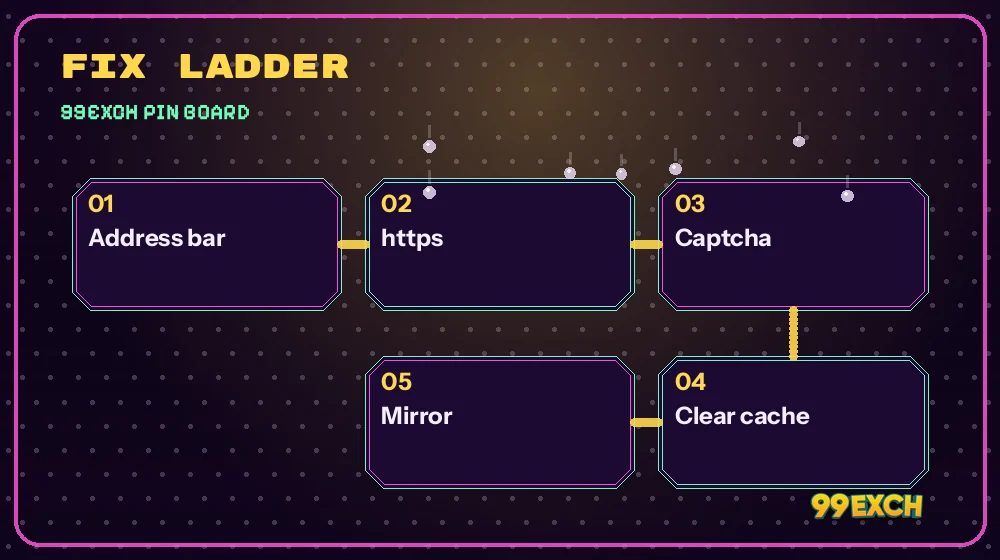
If it keeps failing even when you are sure of every character, the page itself may be stale, a tab left open overnight for instance. Close it, open the address fresh, and try once. Still failing after that? Clear the stored data for that address using the steps in lane 04, then try again.
No check showing under the 99exch com login fields: a fast diagnosis
A 99Exch form without its captcha is either a form that has not finished loading or a form that is not the 99Exch one. Half-drawn boxes and a frozen spinner send you to the cache steps in lane 04. A tidy-looking page on an address you do not recognise sends you back to lane 01 to retype it.
Caps Lock, Autofill and the 99 exch com login Password: Easy, Secure Checks
Caps lock on the 99Exch password box: a quick test
Passwords on the 99Exch sign-in are case-sensitive, so a caps lock left on from a chat message flips every letter and the form refuses the lot. On a laptop, check the key light. On a phone keyboard the shift arrow stays filled while caps is locked. If the password box offers an eye icon, tap it and read what you actually typed.
Autofill dropping an old 99 exch com login password: the safe fix
Browsers remember passwords per address, so after a reset, or after the desk sends a fresh temporary password, Chrome or Safari may still drop the old one into the box and you keep getting refused while the right password sits in your head. Delete the autofilled text, type the new one by hand, and accept when the browser offers to update what it saved. One more trap: a password saved on 99exch.green will not show up on 99exch.red, because the browser files it under a different address.
Username slips that pass for a password problem, fixed fast
Long-press selection in WhatsApp is greedy. It likes to take the full stop after the 99Exch username, or the blank before it, and the form then sees a name that does not exist. Password blamed, username at fault. Drop the copied text into a notes app, delete anything around the name, copy again.
If none of that clears it, the password itself may have changed. Resets go through the 99Exch WhatsApp support desk, and the full routine, including what to do once the new one arrives, sits on the 99exch com login password page. One line from it applies here too: change a temporary password after your first sign-in, then update the saved copy in the browser so autofill stops fighting you.
Stuck Spinner on 99exch Com Login? A Clear, Safe Cache and Cookie Reset
A loading wheel that never stops, an empty page, or a form that draws half its parts and freezes: these usually mean the browser is holding an old copy of the 99Exch login app. Usually a stale copy. The address you saved may have been switched or blocked since your last visit, and the stored files still point to the old place, so clearing that site's data forces a clean download while your 99Exch account itself stays exactly as it was, because only the browser's local copy is removed.
Clear 99Exch site data in each browser: quick steps
- Close every tab that has the 99Exch address open, so nothing reloads the old files while you clear them.
- Chrome on Android: open the three-dot menu, then Settings, Privacy and security, Delete browsing data. Tick Cookies and site data plus Cached images and files, set the range to All time, and confirm.
- Chrome on a laptop: press Ctrl+Shift+Delete, tick the same two boxes, choose All time and delete. To keep other sites signed in, click the icon left of the address instead, open Site settings and clear data for that address only.
- Safari on iPhone: open Settings, then Safari (listed under Apps on recent iOS), then Advanced and Website Data. Search for the 99Exch address and remove it; Clear History and Website Data wipes everything, which is more than you need.
- Firefox: open Settings, Privacy and Security, Cookies and Site Data, Manage Data. Search for the address, remove it and save the change.
- Open a new tab, type the working address by hand into the address bar, and wait for the sign-in form and its captcha to finish loading before you type anything.
- Still spinning? Try a private or incognito tab. If the form loads there but not in a normal tab, an extension such as an ad blocker is probably in the way, so switch it off for that address.
Clearing cookies signs you out of that address, so keep the 99Exch username and password handy before you start. Saved passwords stay unless you also tick the passwords box; leave it empty. It is tempting to tick everything. Do not.
99exch Com Login When the .com Address Is Silent: Verified Mirrors From Our Test
Everything above assumes the address answers. On 12 Oct 2026 it did not: 99exch.com and www.99exch.com gave no response at all when we checked, no error page, just a timeout. No captcha habit or cache clear fixes a server that is not replying. A timeout is not a closed account, either.
The same check, run that evening, found 99exch.red, 99exch.green, 99exch.win and 99exch.live loading the same 99Exch login screen, and why several addresses can carry one sign-in, with your ID and balance following you between them, is laid out on the 99 Exchange com page, while the dated result for one of them has its own write-up under 99Exch red. Two near-misses from that test matter if you like guessing endings: 99exch.in sent visitors to a third-party ID-seller information site rather than the portal, and 99exch.io came back with a not-found error.
So the practical order, roughly: try the address you trust, give it a moment, and if nothing comes back, type a tested mirror rather then one a stranger forwarded. Results drift. A mirror that loads today may be blocked next month, which is why every result here carries its date.
99exch Com Login Search Terms With Clear, Secure Answers
Where 99exch com login fits on this fix page
People who search 99exch com login usually hold an ID already and want the form back. This page treats the phrase as a repair job: the address bar first, then the captcha, the password box and the browser's stored files, with a dated mirror check for days when the .com address stays silent and the 99Exch account itself is fine.
99 exch com login with a gap after 99: same request, quicker fix
Google files the gapped and the joined spelling under one query, so the gap changes nothing there. It matters to a browser, which cannot open anything with a gap in it. Keep 99 exch com login for a search box at most; the bar at the top wants 99exch, a dot and an ending, typed as one piece.
- spaced or joined, it is one 99Exch sign-in
- dots, not spaces, in the address bar
- check the address before the password box
What https 99exch com login means once a browser reads it
The https prefix asks for an encrypted connection and the padlock beside the address confirms it. Typed with spaces it is still only a search phrase. Placed in front of a dotted mirror address it becomes the secure way to reach the 99Exch form.
How http 99exch com login differs, and the safe habit to keep
Plain http drops the encryption that a password box should always have. Many browsers try the https version first; if yours shows a not-secure warning next to the address, close it and type the address again with https before entering any 99Exch password.
Players also search
- 99exch com login
- 99 exch com login
- https 99exch com login
- http 99exch com login
- 99exch login nahi ho raha
- 99exch com login captcha
- 99exch.com not opening
- 99exch login page
- 99 exch login password galat
99exch Com Login Troubleshooting Log: Each Symptom With a Quick, Real Fix
Read the left column for what your screen is doing right now, then follow that row across to the cause and the fix; most rows point back to a lane above, where the longer explanation sits, and two point out to sibling 99Exch pages that own the detail. Scan, match, fix.
| Symptom on screen | Likely cause | Fix |
|---|---|---|
| A results list instead of a form | 99exch com login typed with spaces, so the browser searched | Type a dotted address in the address bar (lane 01) |
| Not-secure warning beside the address | An http prefix, or a look-alike address | Type it again with https and check the spelling before any password |
| Form returns asking again, no clear message | Captcha mistyped or expired | Take a fresh code, reload if needed, copy it exactly (lane 02) |
| No captcha on the form at all | Page half-loaded, or not the real 99Exch form | Clear site data, or type the address again by hand |
| Password refused though you are sure | Letters flipped by caps, a saved password from before, or junk stuck to the name | Type both fields by hand (lane 03) |
| Old password stops working after a reset | The reset replaced it with a temporary one | Use the password from the WhatsApp chat, then change it |
| Endless spinner or an empty page | Stale cached files or cookies for that address | Clear that site's data and open a fresh tab (lane 04) |
| Loads in incognito, not in a normal tab | An extension blocking the form's scripts | Switch the ad blocker off for that address |
| Nothing, then a timeout | Server not replying; 99exch.com behaved like this in our 12 Oct 2026 check | Use a tested mirror (lane 05) |
| An ID-seller site opens instead | Wrong ending, such as 99exch.in on 12 Oct 2026 | Go back and type a mirror you trust |
One worked pass through the 99Exch log, start to finish, made clear
A composite of the usual case. Someone types http 99exch com login into the Google app, gets results, taps one, and lands on an address that just spins and then times out. Row nine. They open Chrome, type 99exch.red by hand, and the form appears with its captcha. The first try fails becuse the keyboard suggested a word in the captcha box. Row three. A fresh code, typed slowly, and the password is then refused, which turns out to be an autofilled one from before a reset. Row five, and they are in.
Screen not in the log? Send the 99Exch WhatsApp desk (+91 81097 11726) a screenshot plus the address exactly as you typed it, spaces and all, since those two things settle most cases faster than a paragraph of description. Password trouble that survives every fix above belongs on the 99Exch password reset page, and once you are through, the 99exch login screen page explains each field and what opens after sign-in.
99exch Com Login FAQ: Quick, Trusted Answers for Stalled Sign-Ins
Why does 99exch com login not open the sign-in page?
Usually because the phrase went into a search box, which returns a list of results instead of the form. Type a dotted address with no spaces into the address bar. If that address times out, as 99exch.com did on 12 Oct 2026, switch to a tested mirror such as 99exch.red.
Should I use https or http for 99exch com login?
Use https. The s means the connection is encrypted, so your username and password are not readable on the way to the 99Exch server. Plain http drops that protection. If the browser shows a not-secure warning next to the address, do not type your password on that page.
What should I do if the 99Exch captcha keeps failing?
Take a fresh code and copy it exactly, with no extra space and no keyboard suggestion. If the form has no refresh option, reload the page and type the password again. A tab left open for a long time often clears once you close it and open the address fresh.
Why is my 99exch com login password rejected?
Nearly always something in the typing, and this page maps it in three places. The coin-slot card near the top shows the 99Exch password box as the portal expects it, with caps off. Row five of the jam log names the usual slips. If none fits, the 99exch com login password page covers a desk reset.
What if 99exch.com does not load at all?
Then the address is blocked or not replying, and no browser fix will help. On 12 Oct 2026, 99exch.com gave no response while 99exch.red, 99exch.green, 99exch.win and 99exch.live loaded the same 99Exch login screen. Use one of those with your existing ID.